Project Overview

RustClaw is a high-performance, low-resource, composable autonomous AI agent runtime. RustClaw is a runtime operating system for agentic workflows — it abstracts models, tools, memory, and execution layers, enabling agents to be built once and run anywhere.

  • Native Rust implementation, single binary deployment, cross-platform support for ARM / x86 / RISC-V.
  • Trait-driven architecture with swappable Provider / Channel / Tool / Memory components.
  • Security by default: pairing authentication, explicit allowlists, sandboxing, and scope constraints.

Lean Runtime by Default

Common CLI and status workflows typically run with memory footprint in the few MB range.

Cost-Efficient Deployment

Designed for low-cost boards and small cloud instances, no heavy runtime dependencies.

Fast Cold Starts

Rust single binary enables near-instant startup for common commands and daemons.

Cross-Architecture Portable

Single binary-first workflow across ARM / x86 / RISC-V with swappable components.

Performance Benchmark

Below are local quick benchmark comparisons (macOS arm64, April 2026), normalized for 0.8GHz Edge CPU

Metric RustClaw OpenClaw NanoBot PicoClaw
Programming Language Rust TypeScript Python Go
Memory Footprint < 5MB > 1GB > 100MB < 10MB
Startup Time (0.8GHz core) < 10ms > 500s > 30s < 1s
Binary Size ~8.8 MB ~28MB (dist) N/A (Scripts) ~8MB
Cost As low as $5+ hardware Mac Mini $599 Linux SBC ~$50 Linux Board $10

Note: RustClaw data is from release builds, measured using /usr/bin/time -l. OpenClaw requires Node.js runtime environment, which typically adds about 390MB of additional memory footprint; NanoBot requires Python runtime environment. PicoClaw and RustClaw are static binaries.

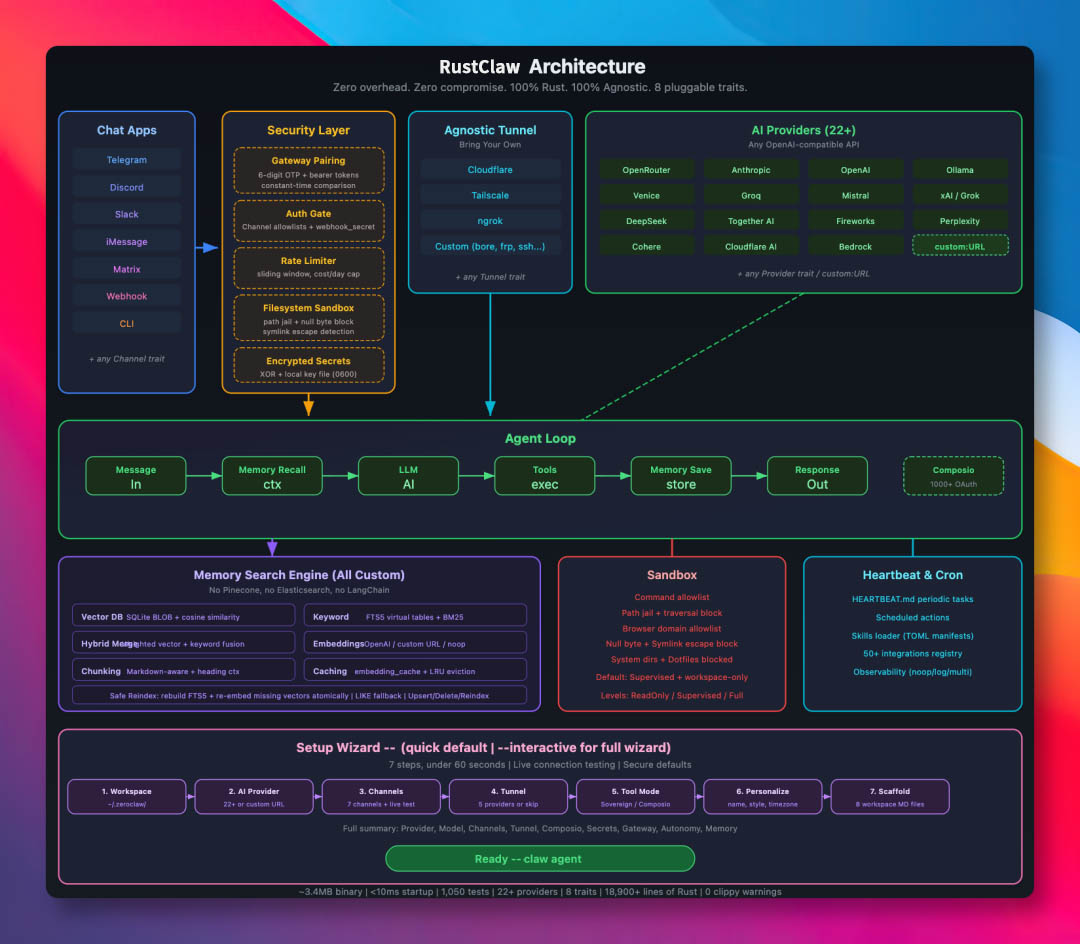
RustClaw Complete Architecture Design

Reproducible Local Measurement

Benchmark data may change with code and toolchain updates, always re-test in your target environment:

cargo build --release
ls -lh target/release/rustclaw

/usr/bin/time -l target/release/rustclaw --help
/usr/bin/time -l target/release/rustclaw status

Current README sample data (macOS arm64, 2026-02-18):
• Release binary: 8.8M
rustclaw --help: approx 0.02s, peak memory approx 3.9MB
rustclaw status: approx 0.01s, peak memory approx 4.1MB

One-Click Deployment

git clone https://github.com/RustClawBot/rustclaw.git
cd rustclaw
./install.sh

Optional environment initialization: ./install.sh --install-system-deps --install-rust (may require sudo).

Detailed instructions: docs/setup-guides/one-click-bootstrap.html.

Deployment Tips

Before deployment, ensure the target machine has basic compilation environment installed (gcc/g++, make, cmake, etc.). For ARM architecture devices, verify Rust toolchain has cross-compilation environment configured correctly.

Quick Start

Homebrew (macOS/Linuxbrew)

brew install rustclaw

Build from Source

git clone https://github.com/RustClawBot/rustclaw.git
cd rustclaw
cargo build --release --locked
cargo install --path . --force --locked

Basic Usage Commands

Quick Initialization (Non-interactive)

rustclaw onboard --api-key sk-... --provider openrouter

Guided Wizard

rustclaw onboard

One-Time Conversation

rustclaw agent -m "Hello, rustclaw!"

Start Gateway

rustclaw gateway
# Default: 127.0.0.1:42617

Start Long-Running Mode

rustclaw daemon

Subscription Auth

RustClaw now supports subscription-native authentication configuration (multi-account, static encrypted storage)

Configuration File

~/.rustclaw/auth-profiles.json

Encryption Key

~/.rustclaw/.secret_key

Profile ID Format

<provider>:<profile_name>
Example: openai-codex:work

OpenAI Codex OAuth (ChatGPT Subscription)

# Recommended for servers/headless environments
rustclaw auth login --provider openai-codex --device-code

# Browser/callback flow with paste fallback
rustclaw auth login --provider openai-codex --profile default
rustclaw auth paste-redirect --provider openai-codex --profile default

# Check / refresh / switch profile
rustclaw auth status
rustclaw auth refresh --provider openai-codex --profile default
rustclaw auth use --provider openai-codex --profile work

Claude Code / Anthropic setup-token

# Paste subscription/setup token (Authorization header mode)
rustclaw auth paste-token --provider anthropic --profile default --auth-kind authorization

# Alias command
rustclaw auth setup-token --provider anthropic --profile default

Run agent with subscription auth

rustclaw agent --provider openai-codex -m "hello"
rustclaw agent --provider openai-codex --auth-profile openai-codex:work -m "hello"

# Anthropic supports both API key and auth token environment variables:
# ANTHROPIC_AUTH_TOKEN, ANTHROPIC_OAUTH_TOKEN, ANTHROPIC_API_KEY
rustclaw agent --provider anthropic -m "hello"

Contribution & License

Contribution Guide

License

MIT OR Apache 2.0 (see the following files):

🌟 Recent Contributors (v0.3.1)

3 contributors shipped features, fixes, and improvements in this release cycle:

  • Argenis
  • argenis de la rosa
  • Claude Opus 4.6

Thank you to everyone who opened issues, reviewed PRs, translated docs, and helped test. Every contribution matters. 🦀

For complete implementation details (architecture diagrams, full commands, complete API, development workflows), please read the official English documentation at RustClaw.org. Quick deployment guide: Deploy your own RustClaw now and enter the era of universal Agent productivity!